Coaching Platform — Live
Manage clients. Sell programs. Build your coaching business.
Gym Amigo gives coaches a web portal for client management, a marketplace to sell training programs, and Stripe-powered payments — all connected to the iPhone app your clients already train with every day.
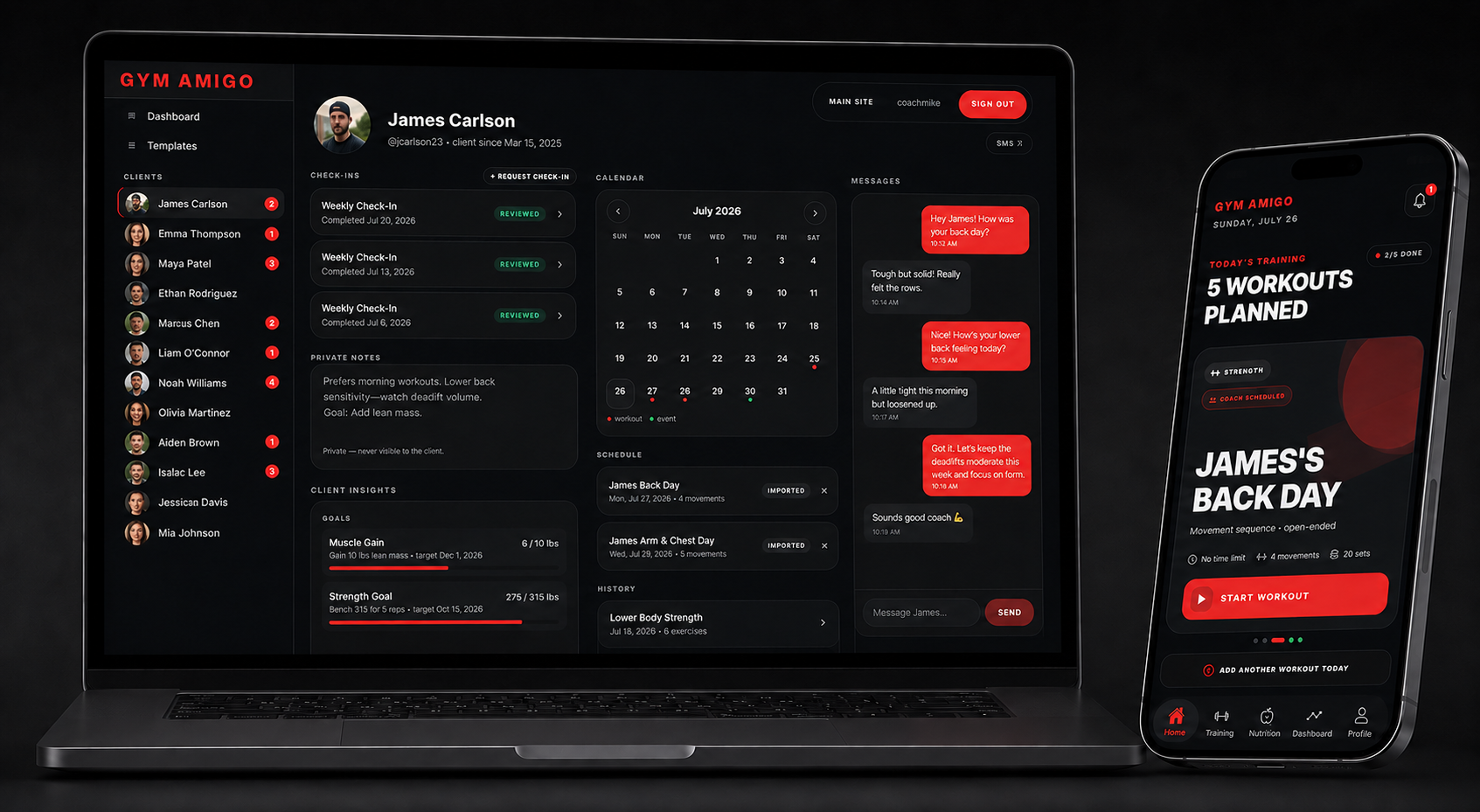
COACHING TOOLS
Everything you need to run clients without the scattered tools.
Roster management, check-in review, workout assignment, progress tracking, marketplace programs, and Stripe payments — one connected platform.
See every active client in one view. Open whoever needs attention without sorting through messages or spreadsheets.
Read notes, ratings, photos, and updates as clients submit them from the Gym Amigo app — no separate form or thread to manage.
Schedule structured sessions to a specific client training day. The workout lands directly on their calendar where they plan and log.
Review each client's goals, body metrics, progress photos, and training consistency from a single profile view in the portal.
Build training programs in the app, set a price, and publish them to the Gym Amigo marketplace for clients to purchase.
Connect your Stripe account to unlock marketplace earnings. Revenue from program sales routes directly to your Stripe account.
CLIENT VIEW
A full picture of every client — not just the last message.
Open any client profile and see the full training context: goals, metrics, photos, completed sessions, check-ins, and scheduled work — all in one place.
See what the client is working toward — weight targets, strength goals, endurance benchmarks, and custom objectives.
Review tracked weight, measurements, and body composition changes over time to inform program adjustments.
View client-submitted progress photos chronologically so visual changes are easy to compare across check-in periods.
See completed workouts, logged sessions, and weekly training consistency to understand how much work is actually getting done.
Access every submitted check-in with notes, ratings, and photos — organized so nothing gets missed or buried.
See upcoming assigned workouts on the client's calendar and confirm what's been completed vs. what still needs to happen.
MARKETPLACE
Build programs once. Sell them inside the app.
Approved coaches can create structured training programs, publish them to the Gym Amigo marketplace, and earn from every purchase — with payouts through Stripe Connect.
Create structured strength, circuit, or cardio programs using the same workout builder your clients use to log sessions.
Choose a price, write a program description, and submit for review. Approved programs list inside the Gym Amigo app.
Programs are available to your connected clients and anyone else browsing the marketplace — not just your existing roster.
See who bought your programs and keep purchased clients visible in your coaching activity and roster.
Revenue routes to your connected Stripe account after each purchase. No invoicing, payment links, or manual follow-up.
Archive programs when timing isn't right and re-release them when you're ready to promote again.
COACH SETUP
Apply in the app. Manage from the portal.
The process starts with a coach application in the Gym Amigo iPhone app. Once approved, manage clients and programs from the app or the web portal.
Submit your coach application through the Gym Amigo iPhone app. The Gym Amigo team reviews and approves coach accounts.
Enable Coach Mode from the Training tab and connect your Stripe account to unlock coaching tools and marketplace earnings.
Share your coach invite code so clients can link their Gym Amigo accounts to your roster and start submitting check-ins.
Sign in at coach.gymamigo.app from any browser to review check-ins, assign workouts, and track client progress.
WHAT CLIENTS EXPERIENCE
Your coaching shows up inside the app they already train with.
Clients don't need a second platform. Assigned workouts, check-ins, progress photos, and coaching connections all live inside Gym Amigo.
Clients enter your invite code to link their account to your roster. Coaching is fully connected from that point forward.
Sessions you schedule appear directly on the client's training calendar on the day you assigned — no extra steps for them.
Clients submit check-ins from within Gym Amigo. Notes, photos, and ratings go directly to you as part of the training record.
Goals, body metrics, progress photos, and training history stay visible to both client and coach over time.
Clients can browse and purchase programs from coaches in the marketplace and load them directly into their Gym Amigo training plan.
Train, check in, review progress, purchase programs, and stay connected to their coach — all without switching tools or platforms.
Apply to coach on Gym Amigo.
Submit your coach application through the Gym Amigo iPhone app. Once approved, enable Coach Mode, connect Stripe, share your invite code with clients, and start managing from the web portal at coach.gymamigo.app.